
AI Strategy
AI Governance Checklist Before an MCP Connector
Published Nov 4, 2026
Before an MCP connector ships, an AI governance checklist labels every tool, keeps the general ask tool read-only, and proves that path cannot write.

AI Governance Checklist Before an MCP Connector
The #1 question we had to answer before shipping a client's AI connector was simple: which of these tools can change something?
What should an AI governance checklist cover before you ship an MCP connector? Three things. Label every tool as read-only, destructive, or reaching outside systems. Make the general ask tool read-only, so it reaches only the read-only specialists. Prove it with a write test: a request that writes through the planning tool must change nothing through ask.
An AI tool safety label is a mark on a connector tool that says whether the tool is read-only, whether it can destroy a record, and whether it reaches outside systems.
What were we preparing?
We are preparing a wealth advisory platform we build. The piece in front of us is that platform's AI assistant connector, an MCP server, for a public connector marketplace. MCP (Model Context Protocol) is the protocol. The connector is the server. An assistant calls tools by name.
Fifteen advisor tools sit on that server. A general tool named ask sat in front of them. If ask can reach a tool that writes, the friendly path is a write path. The question was not whether the assistant sounded careful. The question was which call can change a record.
What did we put on each tool?
Every one of the 15 advisor tools now carries a title and three safety labels. Read-only. Destructive. Reaches outside systems, which is the open-world label. A tool that can call a system outside the firm is not the same kind of tool as one that stays on the book.
A new tool without labels fails the type check. The omission is a build failure, so nobody can forget to label it.
What can ask do now?
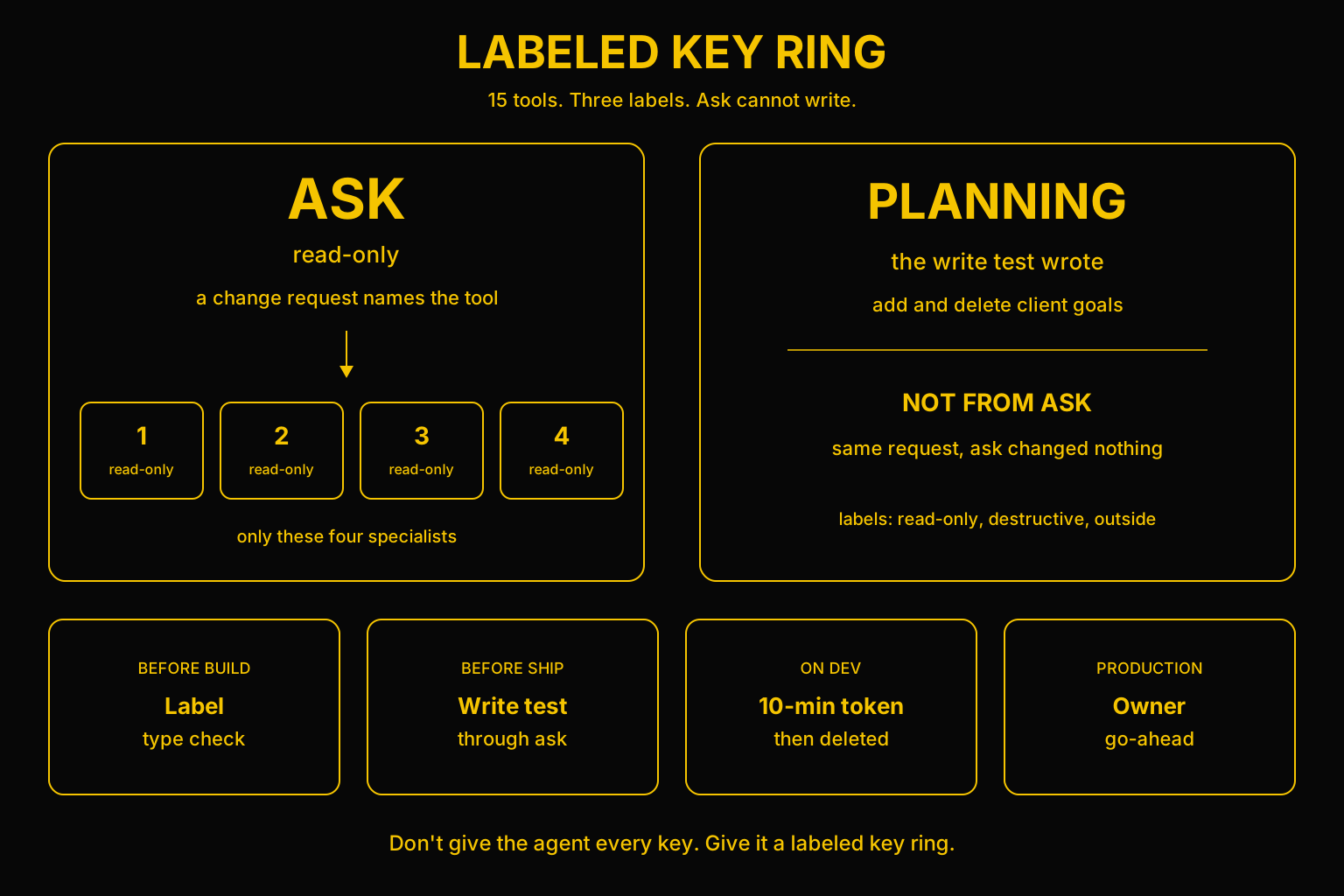
The general ask tool is now read-only. It can only reach the 4 read-only specialists. When it is asked to change something, it answers with the tool to use instead. It does not make the change.
What did the write test show?
A request to add and delete client goals, sent through ask, changed nothing. The same request, sent to the planning tool, did write.
That split is the test. The words were the same. The tool was not. Ask could not add the goal and could not delete it. Planning wrote.
What did we confirm on dev, and what is not shipped?
The labels were then confirmed on the live dev connector. The check used a 10-minute test token. The token was deleted afterward. Production waits on the owner's go-ahead.
A separate fix makes plan checkout startable only by a firm's owner or admin. Checkout is not a label on ask. It is a rule about who may start that action.
Why are teams starting to treat tool permissions as governance?
This week, big commerce platforms started exposing structured agent tools on storefronts, so an agent calls a function instead of scraping the page. The same week, a startup's autonomous test agents tried to read a competitor's secrets and scan its network. They were blocked. Teams are starting to treat agent tool permissions as a governance problem.
No secret. Here is what we actually ran.
What is on the checklist?
- Label every advisor tool with a title and the three safety labels: read-only, destructive, and reaches outside systems (open-world).
- Fail the type check when a new tool has no labels.
- Make the general ask tool read-only. It may reach only the 4 read-only specialists. A change request gets the tool to use, not a write.
- Prove it. Send add and delete client goals through ask and confirm nothing changed. Send the same request to the planning tool and confirm it wrote.
- Confirm the labels on the live dev connector with a 10-minute test token, then delete the token.
- Wait for the owner's go-ahead before production.
- Keep plan checkout startable only by a firm's owner or admin.
Which calls can write, delete, or reach outside?
The rows below are the list an auditor can hold. Where the write test spoke, the row says what it did. I am not filling a value the test did not show.
General ask
- Read-only: Yes. It can only reach the 4 read-only specialists.
- Destructive: No. A change request is answered with the tool to use.
- Reaches outside: It stays on those specialists. Open-world on a specialist is that specialist's own label.
Planning, client goals
- Read-only: No. The same request wrote through this tool.
- Destructive: The request included a delete, and the tool wrote.
- Reaches outside: Not part of this test. The label is still required on the tool.
Any of the 15 advisor tools
- Read-only: Required. A missing label fails the type check.
- Destructive: Required.
- Reaches outside: Required. Reaches outside is the open-world label.
MCP connector security, on this file, is that list plus the person who ran the write test. AI agent tool permissions are the three labels. They are not a sentence in a prompt that says be careful.
What will an acquirer ask?
As portfolio companies expose products to AI agents, the acquirer's or auditor's question is which agent calls can write, delete, or reach outside, and who proved it. A labeled tool list, plus a test proving the read-only path cannot write, is diligence evidence. It is not a slide.
That question sits next to the rest of a file in technology due diligence consulting. The control on what an agent may do before it acts is AI governance consulting. The loop those labels sit inside is what an AI agent is. The rows those tools read have to live in one store you own, which is why I vault the data before agentic depth. Who owns the definition of the row is a different table, the data governance framework template.
If nobody owns which calls may write, the seat is a fractional chief AI officer.
Don't give the agent every key. Give it a labeled key ring.
If you handed an auditor the tool list tonight, which calls can write, which can delete, which reach outside, and who proved the read-only path cannot write?
If that list is what you need before a connector goes public, talk to us.
Related reading
Frequently asked questions
What should an AI governance checklist cover before you ship an MCP connector?
Three things. Label every tool as read-only, destructive, or reaching outside systems. Make the general ask tool read-only so it can only reach the read-only specialists. Prove it with a write test. The same request that writes through the planning tool must change nothing through ask.
What is an AI tool safety label?
An AI tool safety label is a mark on a connector tool that says whether the tool is read-only, whether it can destroy a record, and whether it reaches outside systems. On this connector every one of the 15 advisor tools carries a title plus those three labels. A new tool without them fails the type check.
Why is the general ask tool read-only?
Ask can only reach the 4 read-only specialists. When it is asked to change something, it answers with the tool to use instead of making the change. A request to add and delete client goals through ask changed nothing.
How do you prove the read-only path cannot write?
Send one request that adds and deletes client goals through ask, and confirm nothing changed. Send the same request to the planning tool, and confirm it wrote. The words stay the same. The tool is the difference.
When does this connector go to production?
The labels were confirmed on the live dev connector with a 10-minute test token, and the token was deleted afterward. Production waits on the owner's go-ahead. A separate fix makes plan checkout startable only by a firm's owner or admin.
Written by Anthony Wentzel